I Built an SEO Agent. Its First Command? Fix My Substack.
This is the 1st experiment in my Explore how AI transforms data and growth series.
Based on How to Find Your Place in the Growth Marketing, SEO is one of the work types most easily automated in growth marketing, so an SEO Audit Agent became an easy choice for my 1st experiment.
Table of Content
4 Tips For Quickly Optimizing SEO On Substack
Reflection: The Learning Flywheel, Why Building in Public Rewards
The SEO Audit Agent
Agent Setup
My requirements for this agent are: free, no technical help needed, 5-20 websites, reliability-focused.
To meet my needs, Claude Code suggested using Gemini API, Serp API, and Jina AI Reader API.
Here’s the agent’s Github Repo: https://github.com/Ellen1889/ai-seo-audit-agent
The specific usage instructions are in the README. Even without programming experience, you can set it up in under 10 minutes with Claude’s guidance. It’s free to use.
API Limits
While it’s “free”, you need to be aware of each API’s limits:
SerpAPI Free Tier: 100 searches per month (equivalent to 100 website audits)
Gemini API Free Tier: Has rate limits (15 requests/min)
Jina AI Reader: Free to use
For personal bloggers or small websites, these free quotas should be sufficient.
The Sequential Workflow
It uses 3 agents to achieve this:
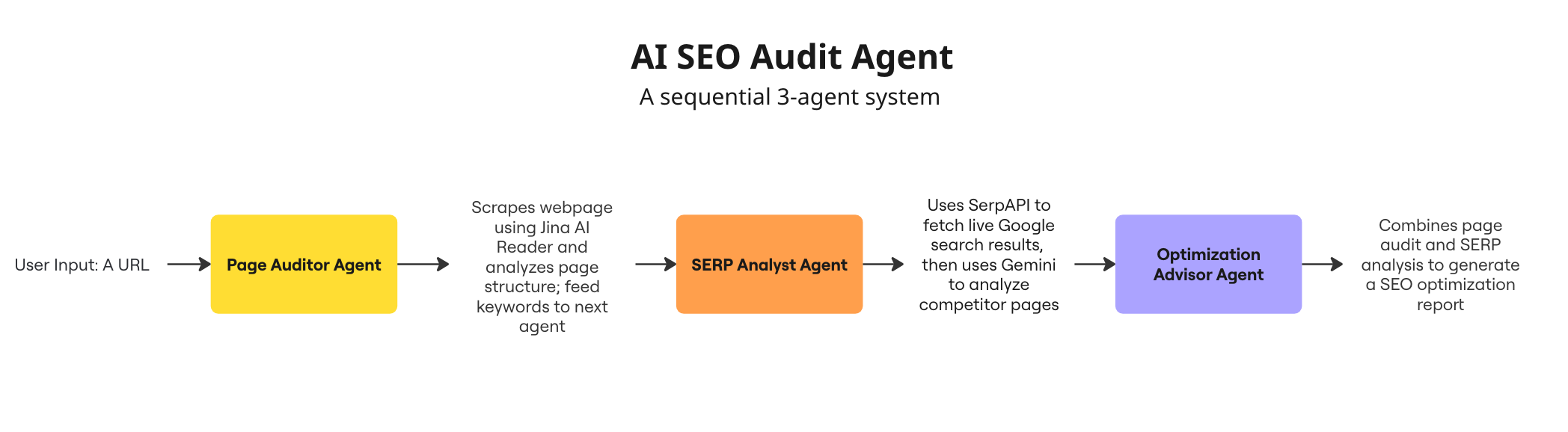
Agent 1: Page Auditor
Scrapes the webpage using Jina AI Reader
Analyzes title tags, meta descriptions, headings
Counts words and identifies keywords
Finds technical SEO issues
Identifies content opportunities
Agent 2: SERP Analyst
Searches Google for your primary keyword
Analyzes top 10 ranking pages
Identifies competitor patterns
Finds content gaps and opportunities
Suggests differentiation angles
Agent 3: Optimization Advisor
Combines insights from both previous agents
Generates a SEO audit report
Prioritizes recommendations (P0/P1/P2)
Provides implementation roadmap
Estimates expected impact
Testing Results: My Substack Has So Many Issues
I used my previous post's URL as a test. For a simple blog site, the entire audit process took about 3 minutes. You can find the audit report here.
As someone who’s an SEO outsider, I found it very useful. Turns out Substack has so many places where SEO optimization can be done, and I hadn’t done before.
For example, I didn’t know Substack could directly add META data, and I was lazy about optimizing the alt text for images in articles. The agent pointed out all these issues one by one.
4 Tips For Quickly Optimizing SEO On Substack:
1. Add Meta Data to Your Substack Posts
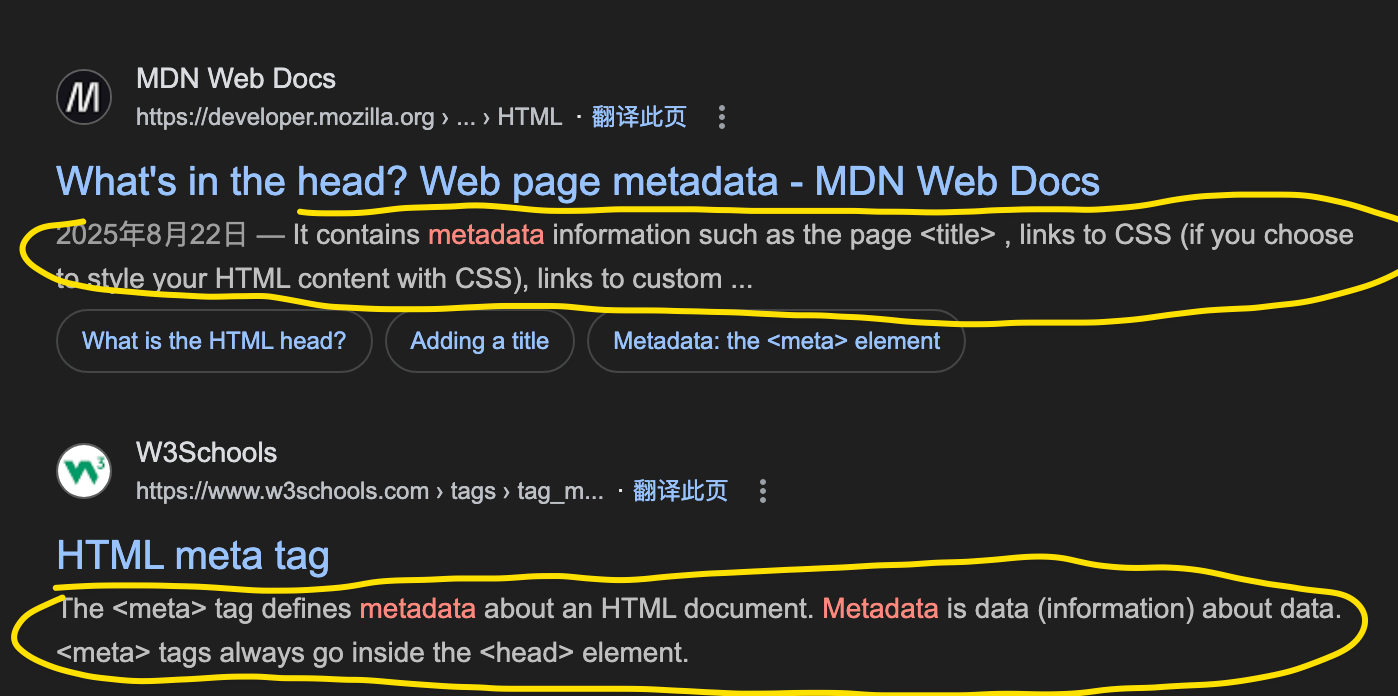
Metadata is “data about data” for a webpage, providing search engines with information to understand and categorize the page’s content.
How to find it:
In each article’s editing page, there’s a Settings in the bottom right corner. Click it and it will show SEO Options. Click that and you’ll see the interface below. Enter your desired meta data into the SEO description field.
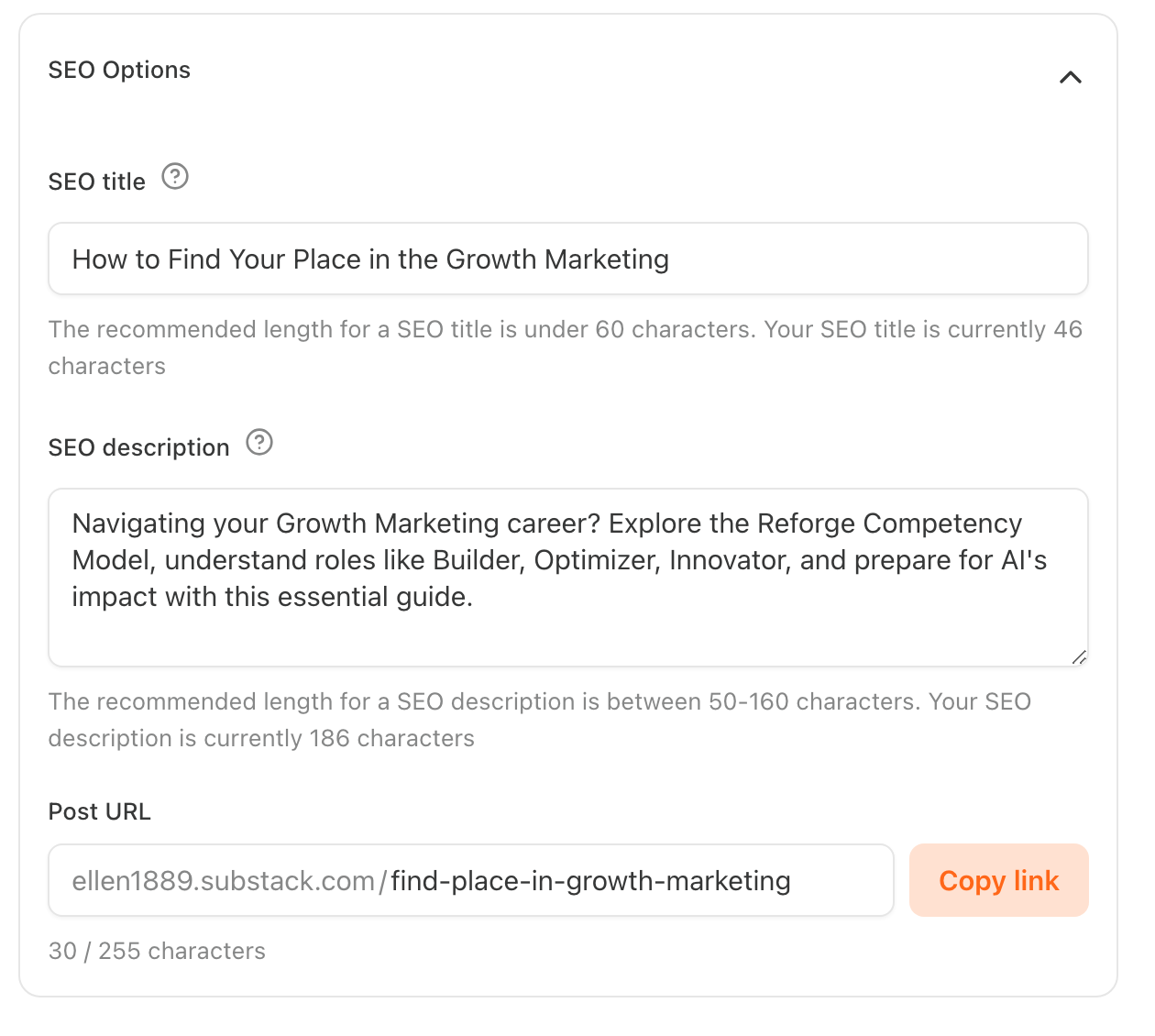
2. Optimize URL Structure
This is also in the SEO Options where you modify the Post URL.
Colin Gardiner shared some URL tips in The Complete Guide to Optimizing Your Substack for SEO:
Keep it short, aim for 3-5 keywords maximum
Use your main target keyword near the beginning of the slug
Separate words with hyphens, never underscores or spaces (example: “productivity-tips-2024”)
Remove unnecessary words like “the,” “and,” “a,” or “in”
Avoid special characters, numbers, or dates unless absolutely necessary
Make it readable by humans. The URL should make sense when read aloud
Match the URL closely to your post title when possible, but shorter
My original default URL was:
https://ellen1889.substack.com/p/how-to-find-your-place-in-the-growth.
Now I’ve changed it to:
https://ellen1889.substack.com/p/find-place-in-growth-marketing
3. Improve Image Alt Text
This needs no extra explanation. What I need to do is overcome my laziness.
4. For Early-Stage Substack Creators: Manually Submit to Google Search Console
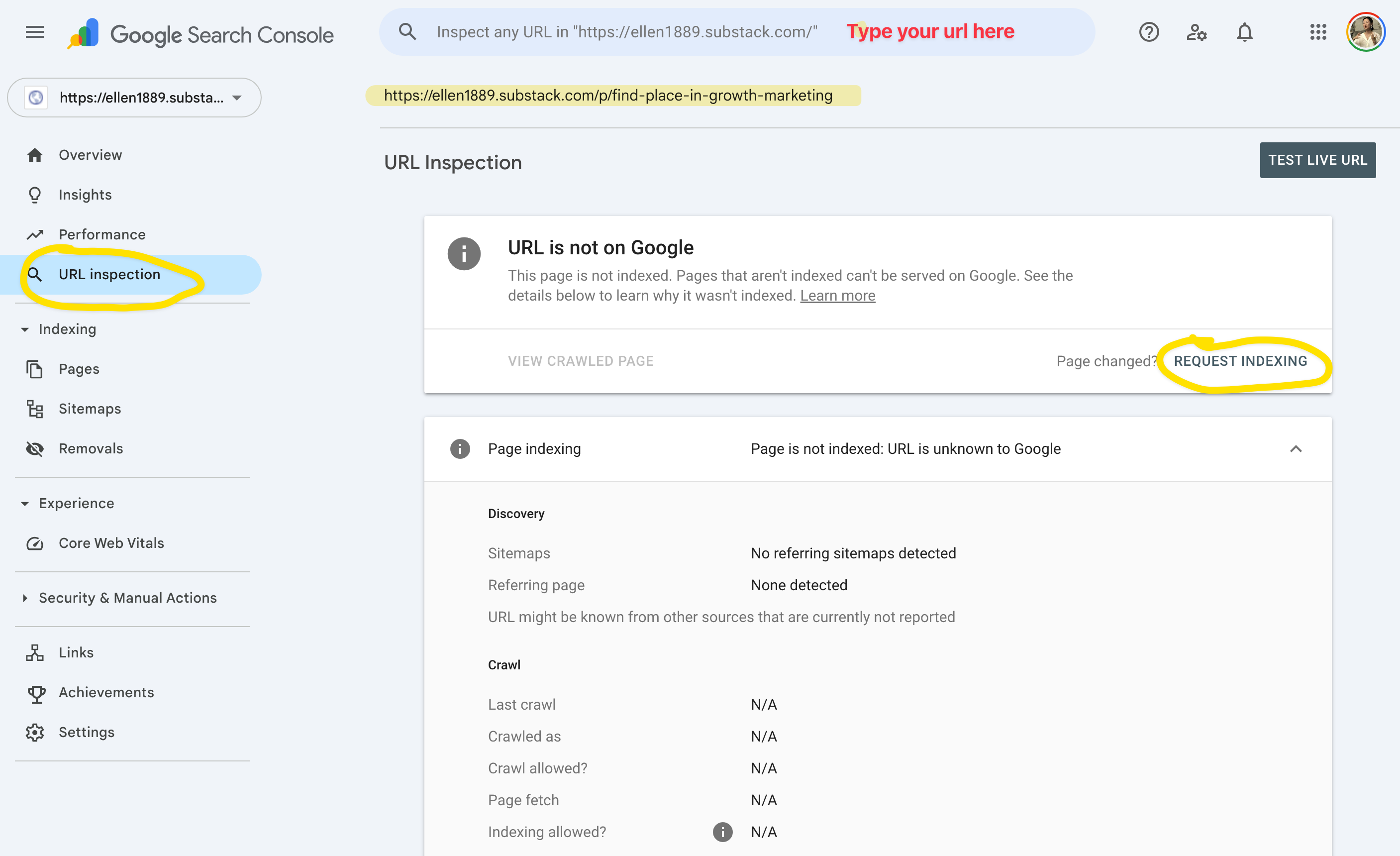
For early-stage Substack creators, Substack won’t immediately generate a sitemap for you (the specific threshold is unclear, possibly related to subscriber count or traffic). Therefore, your content won’t be automatically indexed by Google.
The solution is to use Google Search Console, manually submit each article’s URL, and Request Indexing through the URL Inspection Tool.
Other Optional Optimizations
Add a table of contents
Add a CTA (call to action) at the end
Add more internal article links
I haven’t done much of these yet, but I’ll gradually add them based on content needs.
Reflection: The Learning Flywheel, Why Building in Public Rewards
There are countless SEO agents and websites. They’ve been sitting in my bookmarks, but I never used them.
Until I decided to have a post about “building an SEO Agent”.
This time, I am super efficient. This made me wonder why and I concluded: the Building in Public Learning Flywheel.
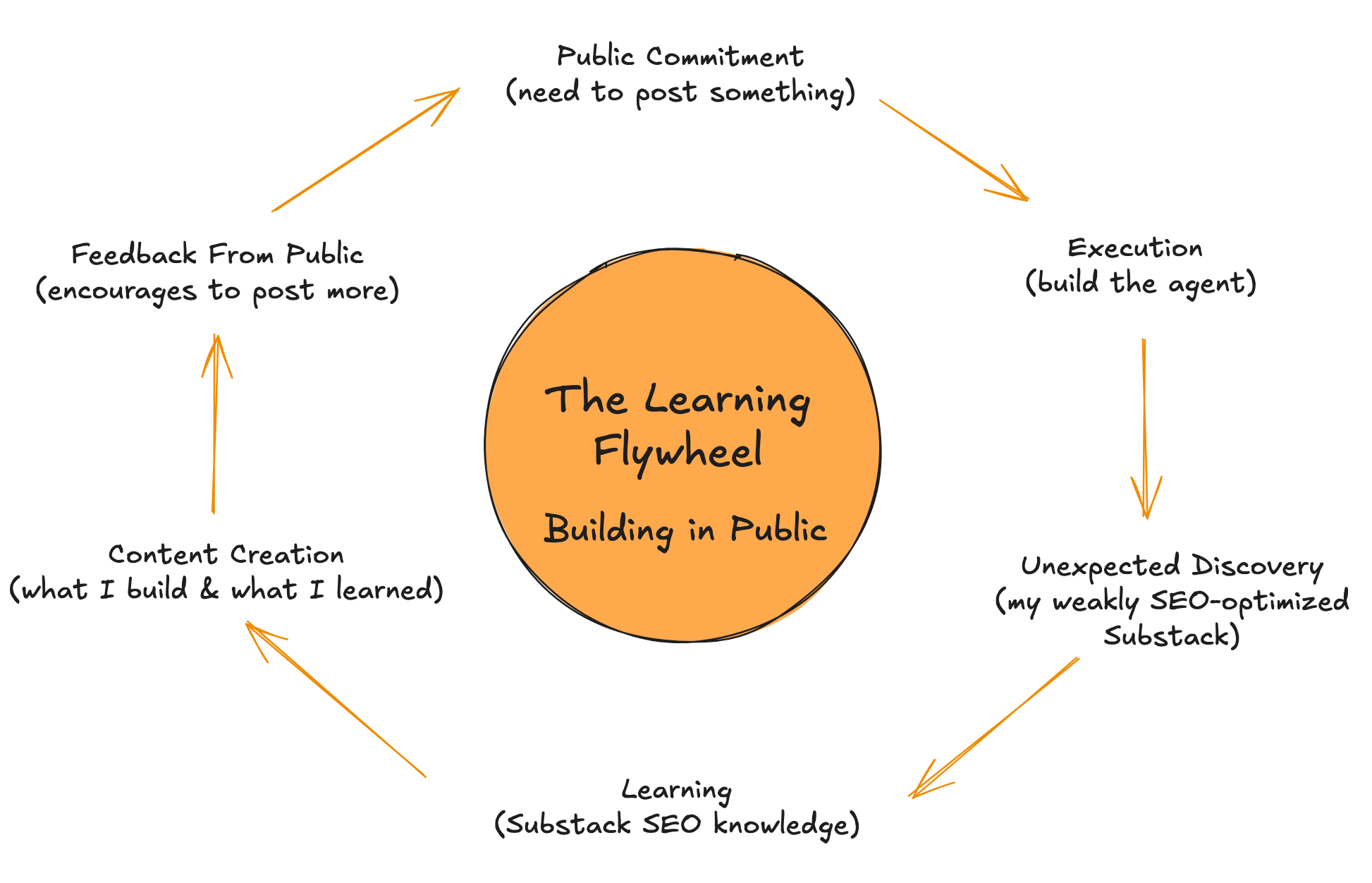
Public commitment turned “I want to learn” into “I must learn.” Because there’s an audience and a commitment, actions become more efficient.
When there’s action, there’s learning. And the learnings are turned into post content. After publishing content, I’ll get feedbacks. Some feedbacks will increase my learning even more, and all feedback will make me more motivated to start the next cycle.